One company.
A connected digital platform.
Compliance BD Digital Platform
A company’s digital experience reaches far beyond its homepage. For Compliance BD, I worked on a platform that connects how the business presents its services, how employees manage everyday work and how customers receive support.
Consistent interfaces · organised information · connected journeys
Connect the experiences.
Keep the purpose clear.
The engineering challenge was to connect several different experiences without making them feel fragmented. Public visitors need clear information. Employees need straightforward personal workflows. HR needs organised operational tools. Support teams need a shared view of customer conversations. Each experience has a different purpose, but all need a consistent product language.
I approached the project as a connected product: the public website helps people discover the business, while the operational experiences help teams carry out the work behind it.
From interface decisions
to working application flows.
A coherent interface
I shaped responsive layouts, reusable components, navigation, page hierarchy and interaction details around a shared visual identity. The public website and operational workspaces follow the same emphasis on clear structure and readable information.
Connected business workflows
I worked across employee records, attendance, leave, payroll, reporting, task and asset workflows, and customer-support journeys. The focus was to connect the user interface to meaningful business actions and understandable status changes.
Content and discovery
I developed editable website content, service and product pages, team profiles, client project references and search-ready page information. Related content, canonical page identities and preserved public links make the information easier to navigate and maintain.
Delivery and verification
I worked with typed code, automated checks, browser testing, accessibility review and deployment preparation. The delivery process combines functional verification with visual review of the desktop and mobile experience.
Design you can explore.
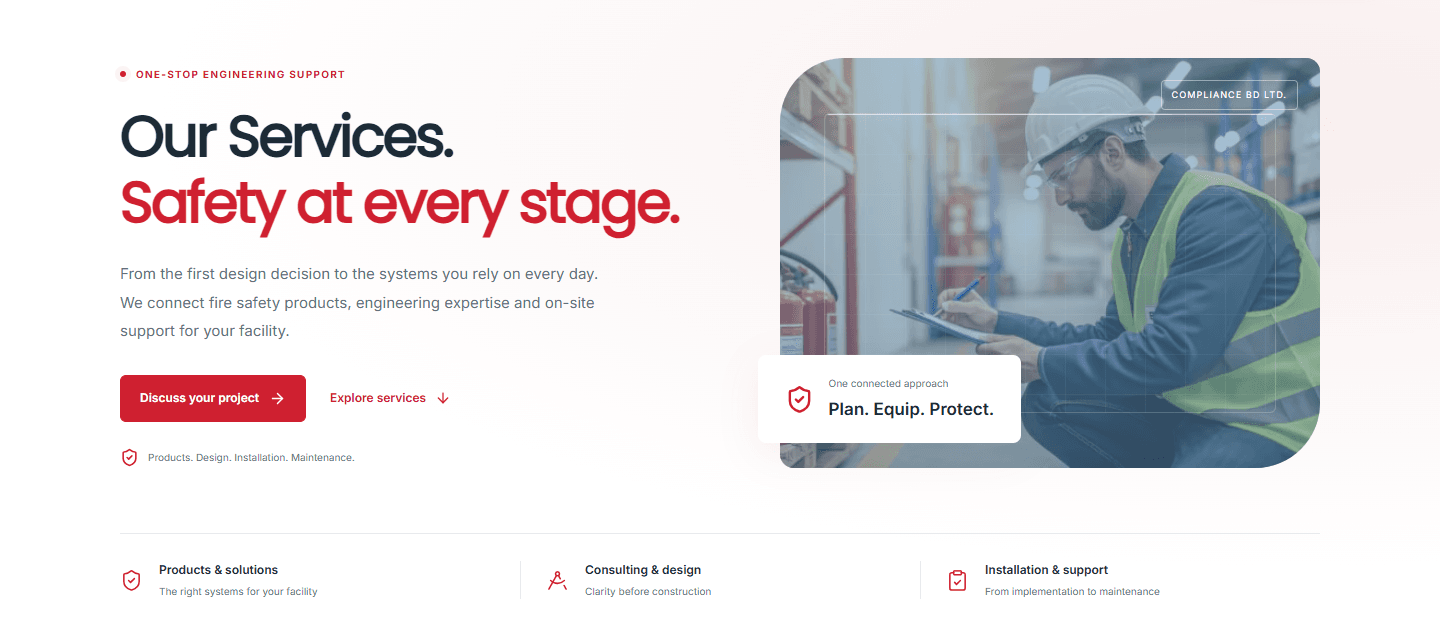
The public service experience
A clear catalogue that connects engineering capabilities with detailed information and project enquiries.
Explore this experience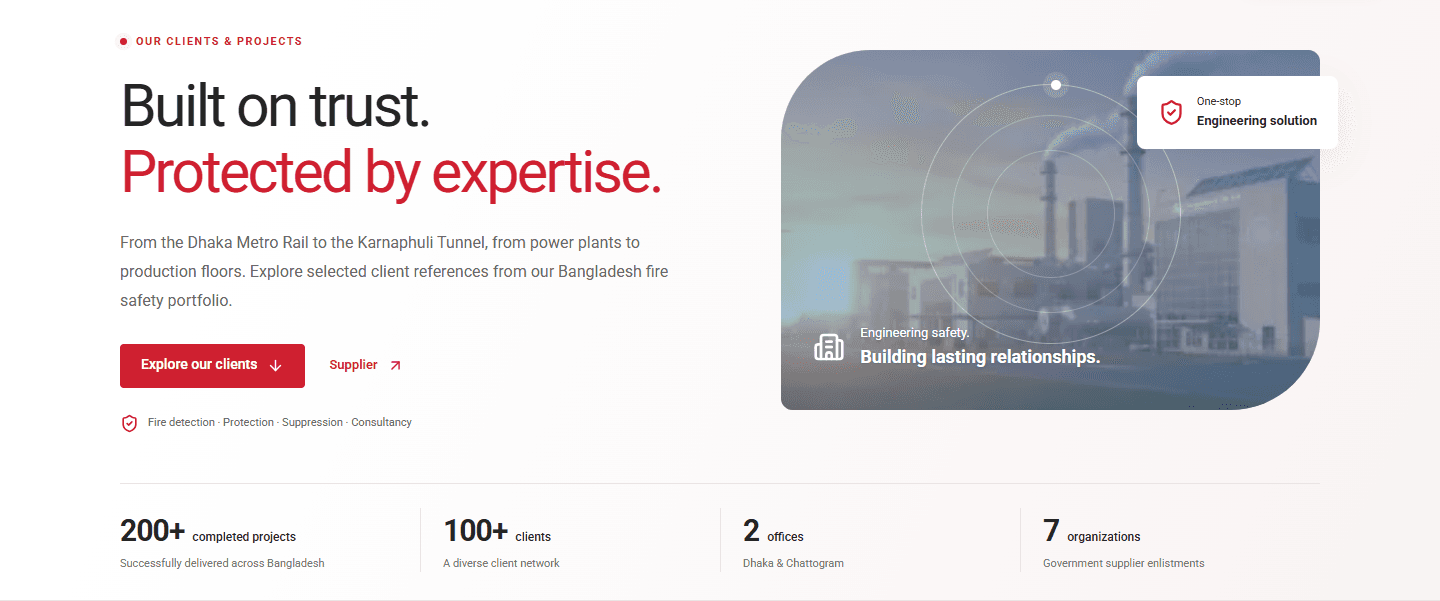
Client and project discovery
A public portfolio connecting client identity, work scopes and relevant service information.
Explore this experienceThe project, from A to Z.
Explore the product by area, from the public website to the workflows that support people and customer service.
The complete feature map 26 capability areas
Responsive corporate website
A branded homepage, company story, contact experience and public information pages designed for desktop and mobile visitors.
Products, services and resources
Product and brand information, engineering service sections, topic-specific detail pages and browsable catalogue resources.
Client project discovery
A searchable client directory, project detail pages, logo-based exploration and a government supplier-enlistment section.
Search and sharing foundations
Page titles, descriptions, canonical URLs, social previews, structured page information, sitemap discovery and continuity for existing public content.
Public team profiles
Department-based team presentation, individual profile pages, biographies, appropriate public contacts and connected profile navigation.
People and organisation
Employee records, departments, organisational relationships and configurable company information within the people-management workspace.
Attendance and working time
Daily attendance, location-enabled check-in, optional photo evidence, work-hour summaries, shifts, duty rosters, holidays and overtime records.
Leave and review workflows
Leave requests, balance information, entitlements and review journeys with visible request status and recorded decisions.
Payroll and financial records
Configurable salary processing, monthly payroll, PDF payslips and records for salary advances, expenses and related adjustments.
Talent, tasks and company assets
Recruitment tracking, performance reviews, assigned tasks and company asset distribution or return records.
Reporting and tax records
Filtered operational reports, configurable tax-related records and policy information, with structured views and export support.
A personal overview
A self-service dashboard bringing together attendance summaries, monthly calendar information, leave balances and assigned work.
Personal request journeys
Employee-facing requests and progress views for leave and other supported attendance, visit or financial-record workflows.
Payslips and personal records
Convenient access to the employee’s own relevant records, payslips and document-related workflows.
Assigned work and resources
A clear view of assigned tasks, company assets and information relevant to the employee’s day-to-day work.
Customer accounts and requests
Customer access journeys and ticket creation with service information, priority and supporting details.
Conversations and attachments
Ticket conversations, staff replies, progress information and supporting image, video or document attachments.
Department queues and assignment
Organised service-team queues, ownership, assignment and transfer workflows to help staff coordinate customer work.
Team collaboration
Staff collaboration through internal notes, shared ticket context and coordinated follow-up within the support workspace.
Notifications and progress
Notifications, live ticket updates and dashboard views that make ongoing customer work easier to follow.
Website editing and version history
A website editor with drafts, previews, publishing and previous content versions, so updates can be prepared and reviewed.
Brand and media management
Company branding, website imagery, team presentation, public content and a reusable media-library experience.
Enquiries and company communication
Website enquiry records, announcements, business information and administrative content that connect public communication to daily operations.
Workflow previews and data exchange
Previewable business operations, supported import journeys, CSV exports and printable or PDF-based information where appropriate.
Mobile and accessibility care
Responsive layouts, keyboard interaction, focus behaviour, readable interfaces and reduced-motion support across the public experience.
Automated checks and release preparation
Type checking, integration tests, browser verification, accessibility checks, production builds and container-based deployment support.
A practical stack.
Built around the product.
The technologies and integrations used across the application, interface, media, reporting and verification layers.
Server-rendered public pages and interactive application workspaces, with typed component and data contracts.
Reusable interface patterns, dialogs, navigation, icons, carousels and responsive visual systems.
Business workflows, content operations, customer-support actions and application integrations.
Structured application records for website content, people-management workflows and customer support.
Managed media workflows and image processing for website and application experiences.
Email-related workflows and supported customer account integrations.
Downloadable reports, structured exports and PDF-based application information.
Map-based location context and selected visual interactions in the interface.
Infrastructure integration and container-based build and deployment preparation.
Integration, browser and accessibility checks supporting functional and visual verification.
The choices behind
the experience.
Design around the user’s task
The public experience, HR workspace, employee overview and customer-support journey have different needs. I kept navigation and page structure focused on the work each audience needs to complete.
Keep the product maintainable
Reusable components, shared page patterns and typed data structures help new pages and workflows fit into the existing product. Website content can be updated through an editor instead of requiring an interface rebuild for every routine change.
Make complex workflows understandable
Forms, filters, status labels, review steps and operation previews make the next action clearer. Reporting and export journeys turn organised records into usable business information.
Built with care.
Appropriate access
Workspaces are designed around the responsibilities of the people using them.
Respectful data handling
Employee and customer information stays within the relevant business experience.
Traceable business actions
Review, history and recorded decisions support responsible operational work.
Build. Verify.
Prepare for what comes next.
- 01
Discover and organise
Map the public content, operational workflows and different audiences into a coherent product scope.
- 02
Design and implement
Build the page hierarchy, visual system, reusable interfaces and connected application workflows.
- 03
Verify the experience
Check behaviour, content, navigation, responsive layouts, accessibility and the release build.
- 04
Prepare for evolution
Keep the product organised through editable content, shared patterns, documentation and deployment support.
Type checking · integration tests · browser checks · accessibility review · production builds
A public brand.
A connected workplace.
A foundation for continued development.
The project brings together a discoverable public brand, organised people-management tools, useful employee self-service and a connected customer-support experience. For me, the work is a practical example of full-stack engineering: translating business requirements into interfaces, workflows and a maintainable product.